


Description:
TwistedBrush Pro Studio features a full collection of realistic natural brushes for such mediums as watercolors, oils, acrylics, pastels, oil pastels, charcoal, pens, pencils, and markers. Supporting the fine-brush engine in TwistedBrush are a brush-effects system, tracing paper, masks, filters, random brush generation, scripting, and full art sets.
Download Here:
http://www.filesonic.com/file/195900182/TwistedBrush_Pro_Studio_v17.28.zip

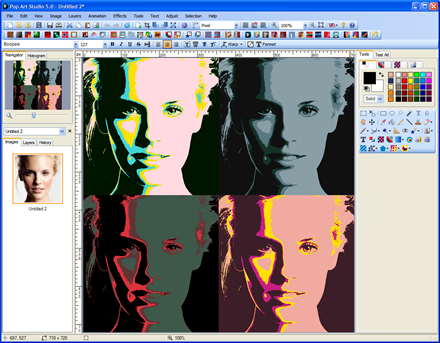
Pop Art Studio is very easy to use graphics editing software. It supports BMP, JPG, GIF, PNG, TIFF and PSD (Photoshop) formatted images. Pop Art Studio contains many Andy Warhol effects and the famous Roy Lichtenstein effect. The program provides an endless selection of text and drawing tools, filters and color adjustment capabilities. Layers allow you to create complex compositions.
New in version 5.2
Shape Collage. Create picture collages in any imaginable shape or form with just a few mouse clicks. Photos are automatically and intelligently placed in the collage. Use your own image as shape or choose from a large collection of clipart and images. Adjust the collage size, number of photos, and collage background
Here are some key features of "Pop Art Studio":
· Andy Warhol, Roy Lichtenstein and other Pop Art effects
· Photo Collage, Pop Art and Artistic effects, Templates
· Photo Mosaic, each section of the image is replaced with another photograph of appropriate average color
· Ultimate Fractal, create fractal designs of amazing detail
· Batch image processing and conversion (resize, watermark, effects)
· Viewing and fixing photos, slide show
· Animations (Gif, Flash) for use in Web Design
· Vector and raster layers, layer groups
· Examples of design elements: banners, logo's, buttons, animations
· Text Art, text effects, and text warp tools
· Shape, Gradient, 3D and Clip Art tools
· A large collection of Clip Art
· Scale, resize, crop, flip and rotate images
· Blur, color, deform, edge, artistic, and texture effects
· Measure, paint bucket, eraser and magic eraser, clone stamp
· Brush, airbrush, effect brush, and history brush
· Noise reduction, edge preserving smooth, sharpening, unsharp mask
. Open, edit and save files and layers in Adobe Photoshop (PSD) format
Note:
1- Use Serial That Included
2- Enjoy!
Homepage: http://anonym.to/?http://www.fotoview.nl/
Download Here:
http://www.filesonic.com/file/195903882/Pop_Art_Studio_Batch_Edition_v5.2.zip
ArtRage Studio Pro contains all the tools of ArtRage Studio, including oils, watercolors, and inking pens.This version is ideal for artists who need to edit their work in more depth, supporting Photoshop compatible filters, real world color blending, post-spray editable stickers, and more.
Get painting without having to learn complex digital tools. ArtRage provides painting tools that behave like real world tools so you can use familiar techniques as you work.
* The Oil Brush and Paint Roller place strokes of paint which can be blended with other colors under the brush.
* The Paint Tube lays down blobs or stripes of thick paint that can be spread out with the Palette Knife.
* The Watercolor Brush paints delicate, translucent strokes that work with canvas wetness to flow together and create wet color gradations.
* The Airbrush sprays a fine mist of paint to create subtle tints without affecting the texture of your brush strokes.
ArtRage tracks more than just the color of the paint on your canvas. The application understands the thickness of the paint, how wet it is, and how reflective your metallic paint is. This allows the tools to work more like real tools than digital tools.
* ArtRage knows how much paint is on your canvas so as you smear thick oils to flatten and spread them they thin down until they won’t spread any more. When thick paints meet their colors mix together until they dry out, so you can create natural looking blends. The texture of the bristles shows up in the stroke while you paint, but you can smooth it out with a Palette Knife if you want a flat result.
* Sometimes you want the unpredictable, chaotic look of a stroke made with a dirty brush. ArtRage remembers what paint you have on your brush head, even if you’ve been mixing on the canvas, so you can turn off automatic cleaning and have your brush head remain dirty until you dip it in the handy Water Glass.
* The Watercolor Brush monitors the wetness of both the canvas and other paint it comes in to contact with, this lets strokes expand to blend realistically, forming soft, translucent washes or thicker, dried edges where it makes sense so you don’t have to keep changing settings to get a variety of natural behaviors.
Homepage
www.artrage.com/
Download Here:
http://www.filesonic.com/file/195906602/ArtRage_Studio_Pro_v3.0.7.zip

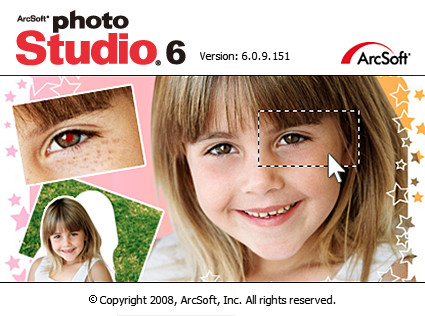
ArcSoft PhotoStudio 6 V6.0.9.151 | 39.06 MB
ArcSoft's world-renowned, affordable photo editing application PhotoStudio now includes more advanced features. ArcSoft PhotoStudio 6 is a powerful imaging editing application with new features to help you enhance, manage, print, and get creative with your digital photos.
Advanced photo editing tools
PhotoStudio 6 offers an array of advanced editing tools, including Simple Selection, Photo Cloning, Multi-Layer Support, Brush and Stamp, Text Layer, Transform, and Print.
Download Here:
http://www.filesonic.com/file/195914671/Arcsoft_Photo_Studuio_v6.0.9.151.zip
Ultra Fractal Animation Edition v5.04 | 8.1 MB
Ultra Fractal is the best tool to create fractal artwork and fractal animations. Whether you are a graphics designer, a professional fractal artist, a video producer, or a complete beginner, Ultra Fractal 4 makes it easy to create beautiful fractal pictures, animated textures, and moving fractal backgrounds.
Features:
It is easy and fun to start using Ultra Fractal with the built-in tutorials. Starting with the basics, you will soon learn how to create your own fractals, change the colors, add layers, use masks, and even create animations. You can also download the PDF manual to print the tutorials.
Explore thousands of fractal types and coloring options
First explore the standard fractal types in Ultra Fractal to get familiar with them. Then connect to the online formula database to download thousands of additional fractal formulas and coloring algorithms contributed by other users.
In Ultra Fractal 5, formulas can now use plug-ins which lets you easily mix and match features. By combining different plug-ins, the possibilities truly become endless. For more information, see Plug-ins in the Ultra Fractal help file.
Enjoy unlimited deep zooming
You can zoom to virtually unlimited depths with Ultra Fractal. Deep zooming is fully integrated and works with all fractal types and coloring options, even those you have written yourself!
Use the classic selection box shown above, or zoom with the mouse by Shift-dragging or double-clicking inside the fractal window. Panning, rotating, stretching, and skewing are also possible, of course.
Tweak parameters with the versatile Explore feature
Choosing parameter values is a breeze with the new Explore feature. Experiment with new parameter values by moving the mouse cursor over a coordinate grid in the Explore window, while the Fractal Mode tool window shows a real-time preview of the result.
Coloring your fractals is easy with Ultra Fractal's gradient editor. Drag the gradient curves up and down to create smooth ranges of colors, or use the Randomize options to quickly try various color combinations. You can also use the gradient editor to add transparency effects.
Compose fractals with layers, masks, layer groups and Photoshop-like merge modes
One of Ultra Fractal's key features is layering. You can place multiple layers of fractals on top of each other to combine them and create intricate coloring and texturing effects. Add mask layers to create transparent areas that will let the underlying layers shine through. Organize related layers in layer groups. Store layers or groups that you often use in the layer presets menu to access them quickly. You can even select multiple layers to edit their parameters together. (Creative Edition only.)
Image import
Import PNG, JPEG or BMP images in your fractals with the built-in image import feature. Simply select a coloring algorithm that contains an image parameter, and you can select any image on your computer to use.
The coloring algorithm determines how the information from the image is used. For example, the standard Image coloring algorithm just displays the entire image in the fractal window.
Create fractal animations easily with the powerful animation features
In Ultra Fractal, every fractal is potentially an animation. Every parameter can be animated individually. Animations can be as long as you want and use any desired frame rate. Editing animations is easy with the powerful Timeline tool window, shown below. You can render animations with optional motion blur to image sequences or to AVI movies. (Extended Edition only.)
Open and organize your fractal files
Organize all your fractal-related files with the integrated Explorer-like file browsers. Quickly scan formula files and parameters with the new thumbnail view and the powerful search tools. Copying and moving fractals, formulas, and parameter sets is easy with drag-and-drop or copying and pasting.
Render your artwork to produce fractal movies and high-quality images for printing and publishing
Create stunning fractal movies and high-quality images in full color at any size and resolution with the Render to Disk feature. Built-in anti-aliasing and motion blur smooths and sharpens rendered images and removes jagged edges. Ultra Fractal exports and renders to JPEG, Photoshop, TIFF, PNG, Windows BMP, Targa, and AVI files.
Accelerate fractal calculations by connecting to other computers on your network
Connect to other computers on your local network or even on the Internet to speed up fractal calculations and disk render jobs. Ultra Fractal distributes calculations over the connected computers to accelerate them, which can easily double or triple the processing power of your own computer. (Extended Edition only)
Write your own fractal formulas
Every fractal type, coloring option, and transformation in Ultra Fractal is a formula that you can edit and customize at will using the built-in syntax-highlighting formula editor. Add your own fractal formulas and coloring algorithms and upload them to the online formula database to share them with other users.
There is no speed penalty ? your formulas will run just as fast as all other formulas because they are all executed by the same fast optimizing built-in formula compiler. The formula language includes complex numbers, arrays, variable types, color arithmetic, warnings, global sections, and debugging support. Full documentation with a searchable compiler reference is included.
New in Ultra Fractal 5 is support for functions and classes in the compiler, which makes it possible to write extensible formulas that can be combined with different plug-ins in any way imaginable.
Share fractals and get help on the mailing list
With excellent help file and PDF manual
An excellent help file in Windows HTML Help format is included with Ultra Fractal that is easy to read and full of information. The help file is available online as well. Alternatively, you can download or order the help file as a PDF manual for easy printing. There are also Spanish and German translations.
For Windows 7, Vista, XP...
Ultra Fractal is designed for Windows 7, Vista and XP. It takes full advantage of Windows Aero and Windows XP themes. Windows 2003, 2000, Me, and 98 are also supported.
Ultra Fractal will take advantage of multicore and multiprocessor systems where possible. You can also run Ultra Fractal on a Mac with VMware Fusion, Parallels, Boot Camp or Virtual PC (PowerPC only), or on Linux with WMware or WINE.
Download Here:
http://www.filesonic.com/file/195918241/Ultra_Fractal_Animation_Edition_v5.04.zip

Rotating or cutting images, removing red eyes now and then - this was yesterday. Image editing of the next generation goes further and addresses directly the weak points of digital photographs, to which even the most expensive cameras are not immune.
Photomizer knows all the hurdles that need to be cleared in order to produce perfect photos; and it provides the suitable tools to obtain them. For beautiful photo albums and complete success at Flickr & Co.
Photomizer is the perfect completion to your digital camera, be it expensive or low-priced.
Because a wrong aperture is easily selected and there is hardly any cure for adverse weather conditions and unfavourable lighting conditions. With Photomizer you re-adjust tonality, increase the contrast, re-sharpen matt images and you get high-definition and colour-intensive photos - fully automatic! Photomizer turns wasted pictures, which otherwise would be irretrievably lost, into natural and attractive photos without giving the impression of artificial editing.
With Photomizer you achieve results, which even professional photographers could only obtain with extensive knowledge and experience...
While other editing programs require extensive training and time-consuming settings, Photomizer starts directly. Fully automatic and with the right sense for correct screws and settings! Photomizer accurately uses a number of photographic tools for optimum image manipulation; these tools automated and precisely edit exactly those unfavourable image attributes that disturb the overall impression! And only those because the automatic object recognition guarantees that exclusively the less perfect image parts are edited while the others remain untouched!
Some of the most important program functions:
Automatic object recognition: manipulates only those image parts, which help optimize the overall impression!
Fully automatic re-adjustment of tonality!
Fully automatic re-sharpening!
Fully automatic contrast optimization!
Touching-up of image through higher definition!
Colour-intensive photos through re-sharpening of matt colours!
Manipulation of colours to get more cheerful images!
Fully automatic system for hue control and saturation!
Fully automatic system for white balance.
Fully automatic system for bright/dark correction.
Elimination of fog and other weather influences.
Elimination of undesired colour casts.
Supported input formats: JPG, BMP, TIFF and RAW (.raw, .crw, .orf, .3fr, .nef, .tiff, .raf, .nrw, .dng, .cr2 and .arw)
Supported output formats: JPG and BMP
Fully automatic batch mode for manipulation of picture series!
Additional option for manual image optimization of each picture!
Reading of EXIF and GEO data from pictures
The Photomizer works generally non-destructive: The original pictures will be not touched at all! All files will be save using different filenames!
Seeing is believing - even more in photography. Test the Photomizer with your own images of e.g. blurred or foggy landscapes, photos that were taken in the snow or when diving, scanned old slides and be surprised.
Additional functions:
Photomizer provides an HDR-Simulator and a scaling optimization unit:
Create amazingly HDR-similar image with the HDR-Simulator - even when using just one image! For creation of a High Dynamic Range image you normally require three images with three different exposures like those created by special cameras. Photomizer only needs one to generate this effect while the other two are automatically calculated internally.
The scaling optimization unit ensures that your pictures are most efficiently displayed on a defined medium. If for instance you have a digital picture frame, your pictures are automatically adjusted to the display - without disturbing black bars! Also suitable for TV-players with cinema resolution 2560 x 1080 pixels!
Possibility to capture pictures or webcams or external cameras!
Technical background of our photo optimisation:
Photomizer is composed of a complex network of psychovisual and mathematical procedures, allowing the software to analyze any photo with high precision, provide visual optimization, and make it look more realistic. The most essential component to this process is the reconstruction of the image in a way consistent with how the human eye would have seen it. Simultaneously, an innovative selective object detection algorithm ensures that the only parts of the picture to be optimized are the parts which need to be. With this process, Photomizer is practically a fully automated photo lab in your pocket: pictures receive a widened dynamic range, human faces in the picture are detected and optimized by relevance, exposure mistakes and colors are corrected, and shadows are lightened. The software can apply any and all of these functions without any required user action.
Wich technology is used to the upscaling and downscaling?
This is accomplished primarily through our newly developed ODU (Object Detection Upscaling), which can resize the original picture by a factor of four without any issues, while simultaneously increasing the picture's quality - a functionality previously only available by means of extremely expensive, specialized hardware. Of course, the more traditional methods of resizing, e.g. Spline, Lanczos, and Gaussian, are also implemented in our software!)
Download Here:
http://www.filesonic.com/file/195923411/Photomizer_v1.3.0.1250.zip

Mojosoft BusinessCards MX 4.0.3 Multilingual | 87.5 Mb
This program will help to design and print a professional business card. The interface of the program has been designed in such a way that even a beginning user will not have problems with using the program.
The process of designing is based on inserting ready for use elements accessible in the program such as figures, images and the background, and freely shifting them on the prepared project. Another advantage of the program is the possibility of saving data about a company or people so that it can be used later while designing a business card. The program uses templates which you can prepare on your own, or you can use ready models , templates of business cards accessible in it. There are 400 examples of business card templates in the program.
Features:
- operating jpg, bmp, wmf , png ,tiff and more graphic formats
- a dozen or so effects which can be used while working on all objects (text , image , backgrounds) for example: shadows, textures, sepia, gradients and others
- export to high resolution (300 DPI , 600 DPI) pdf,jpg,tiff,bmp graphics file
- the size of designed business cards: min 70x40 max 105x65
- the appearance of the interface can be changed
- convert and export to CMYK ( with ICC profiles )
- support right to left languages (like arabic,hebrew)
- support unicode
- print on both sides of the paper (duplex printing)
- multilanguage support
- 400 supported business card paper for ink jet and laser printers, from Avery, APLI, Hisago, Sigel, A-One, Printec and other manufacturers
Download Here:
http://www.filesonic.com/file/195929552/MojoSoft_BusinessCards_MX_v4.0.3.zip

Ulead COOL 3D Production Studio 1.0.1 Portable | 72.08 MB
Ulead® COOL 3D™ Production Studio is a new breed of 3D animation software for high-quality video production. Streamline your 3D text and graphics with advanced tools to produce professional-looking animation.
Sophisticated 3D Objects
Design sophisticated 3D text and objects with intuitive tools. You can use pre-made shapes and styles or create them by scratch. COOL 3D Production Studio imports the most popular 2D and 3D file formats.
Powerful Effects & Animation Control
Drag and drop hundreds of customizable backdrops and animation effects. Apply video backgrounds and add audio to your creations. Use magic, natural texture and particle effects for dynamic-looking animations.
Professional Output
COOL 3D Production Studio exports files out to a variety of formats -- video files, alpha-channel video overlays, Web animations, images, and 3D models. You can also import a COOL 3D Production Studio project file into Ulead video editors' timelines.
System Requirements
* Intel® Pentium™ II compatible processors or above (Intel® Pentium™ III 800MHz recommended)
* Microsoft® Windows® 98, 2000, Me and XP
* 64MB RAM (256MB RAM recommended)
* 128MB available hard disk space (250MB recommended)
* DirectX® 8.1 driver or above
* Display card with 4MB display memory (32MB recommended) which supports DirectX® 7 or above
* Hi Color or True Color display adapter and monitor
* CD-ROM Drive
* Windows compatible pointing device
Home Page - http://www.ulead.com/
Download Here:
http://www.filesonic.com/file/195940452/Ulead_COOL_3D_Production_Studio_v1.0.1.rar


RemoveWAT v.2.2.5 is a Windows 7 crack that completely removes Windows Activation Technologies from the system so that users can validate the illegal pirated copies of Windows 7 as genuine status (some reported as “Tampered Binary” in MGADiag due to patching), forever and permanently.
RemoveWAT supports both 32-bit (x86) and 64-bit (x64) and all editions of Windows 7 and Windows Server 2008 R2.

Download From HotFile.Com


