


Photo-Brush 5 is image editor, painting program, photo retouching tool, photo enhancer and RAW Image Browser for Windows XP, Vista and Win 7.
Over the years we added many rich tools and effects for photo adjusting and photo retouching found in much more expensive tools.
OVERVIEW
Do your images need color adjustments, crop, sharpening or some effects? Photo-Brush is an image editor that loads instantly and it is packed with easy to use features.
Consider this:
All the typical adjustments you need (Exposure, Levels, Hue/Sat/Luma, Cloning, various Sharpening etc.)
Plenty of professional tools (Chromatic Aberration, Barrel-Pincushion, Perspective Compenstation etc..)
RGB, HSL, YCb/Cr, Mask channels
Color lab - create vivid, dynamic photos using natural LRGBY space
Fun tools like Liquid Warp, Little Planet (Stereographic Projection), Fractal Droste effect (image-in-image)
Adobe Photoshop™ plug-in support
RAW support
Starts instantly, optimized code, small footprint, no fluff
FEATURES
Image Editor
Photo-Brush has all the necessary tools for editing and adjusting digital images: Adjusting levels, Gamma, RGB curves, Hue/Saturation, Brightness/Contrast and more..
Photo Retouch
With its special brushes and tools you can remove unwanted parts of your images, clean scratches, remove Red-Eyes, Clean skin of portraits, Cloning with Rubber stamp and more...
Painting Program
Photo-Brush is also an excellent painting program with its Pressure Sensitive tablet support. With texture painting, Artistic, Natural or 3D brushes you can create any work of art. With Cloning you can turn your photos into paintings.
Scanning Software
Photo-Brush has TWAIN 32 support for scanners as well as 32 bit film scanners. It has build in powerful Auto Dust Removal system.
Filter Heaven
There are many filters already build-in, but Photo-Brush can also use Adobe PhotoShop ™ compatible Plug-Ins as well. It can run the plug-ins from anywhere in your computer, even from network drives.
Full bag of fun Effects
Try Warping or add a great touch with Image Nozzle! Add Lens Flare, Sparkles, Age the picture, Replace colors or Colorize black & white pictures; Add cool text in 2D, 3D, and drop shadow. The new effects include Fractal Droste or Little Planet.
Image Browser
A cool new multi threaded RAW/JPG Image Browser was added for your convenience. You can view image thumbnails in any directory on your disk, CD, network or memory chip.
Download Here:
http://www.filesonic.com/file/195891172/Mediachance_Photo_Brush_v5.30.zip

Desktop 1.51 + Crack| 8.35MB
Get the reality on your desktop!
You certainly know, the file queues on your Desktop becomes always longer, daily coming
new files and you lose slowly the overview. Are you missing the certain order, the
feeling of a genuine desk, just the reality?
“Real Desktop” brings back this experience to you again!
Your icons behaving now owing to the high performance physics engine like real objects which one you can touch and move, as on a real desk. By this revolutionary new type of representation of the Desktop you dip off into a new dimension of full live and exciting dynamics. Thus you recover the possibility of designing your personal order in the own chaos exactly as in the real life.
Do you have older files on your Desktop, which you would like to put aside for later?
No Problem! “Mark it, grap it and throw it just in a corner.”
Are some files more important than others for you? You have the possibility with “Real Desktop” to change the (visual) the size of your files. In this way, important files take more place on the desk than the other ones and are thus easier to find and reach.
A exceedingly special aspect is however the own actualization. You have the choice between different background and icon styles. It is particularly interesting that you can realize your completely individual Style by own graphics.
Features:
> Functionality
– Change the size of the icons
– Rotate automatically into normal direction
– Fade automatically file names in/out
– Show or hide filenames
– Drag & Drop
> Running behaviour
– Multimonitoring Support
– 3D Sound
– No performance losses with resting condition of the symbols
– Very less resources needed
– Very efficient, thanks to the “Reality Engine”
> Design
– Reflecting surface
– Different wastebaskets
– Different themes are selectable/changeable
– Icons are reflecting the environment
– Any desired wallpaper as a picture at the wall, which is shown with inactivity
– Different background and icon styles
– Own graphics are integrate able
– Different light directions are selectable
– Extended lighting attitudes
Download Link:
Hotfile
Password:
wwww.pinoyrepublic.org


Control your desktop experience Theme Manager, and manage all your skins, themes,
wallpapers, icons, etc. from a single interface. You can even mix and match them
together to create your own Suite files! Theme Manager is a program that changes
the look and feel of the entire Windows environment. It works by talking to existing
desktop enhancement programs and then applying a MyColors or Suite file. In short,
Theme Manager is a front-end to other desktop enhancement programs to simplify
the user experience.
Theme Manager supports:
* Wallpapers
* Visual Styles (WindowBlinds)
* Animated Wallpaper (Deskscapes format)
* MP3 Players (Windows Media Player, Cool Player)
* Sounds (SoundPackager format)
* Mouse cursors (both Windows and CursorFX)
* Logon Screens (LogonStudio Vista format)
* Boot Screens (BootSkin Vista format)
* Icons (IconPackager themes)
* Widgets (DesktopX Widgets)
* Screen Savers (Windows format)
* Launchers (ObjectDock, WorkShelf)
* and more
System Requirements
> Windows XP (32 bit)/Server 2003/Vista
> 200MB free drive space
> 256MB RAM
> Impulse must be installed in order to download and update software
Download Link:
Hotfile


Likno Web Button Maker is a user-friendly software for creating eye-catching and professional custom 3D Web buttons fast and easy.
With this program you can design a variety of 3D Web buttons with different effects, backgrounds, and text options by customizing their dimension, text, shadow, lighting, texture and shape. Create high-quality navigation buttons for your Web pages with this innovative 3D web button generator.
Version 2.0.144 improves image rendering, texture, and lighting feature factors.

* Back\Forward buttons (does not support IE8)
* Longhorn theme for Firefox
* Topshellstyle

Cloudeight | Win | English | 6 MB
3D Tropical Fish Aquarium III animated screensaver features an animated aquarium with bright and colorful tropical fish, corals and underwater plants. This screen saver is in a class by itself. You'll turn your computer monitor into a living tropical fish aquarium complete with natural aquarium sounds (or choose no sounds at all - it's up to you!). You can even add more tropical fish to customize your tropical aquarium just the way you want it. You'll have your very own aquarium - without the water and without the mess!

Like the look of Vista but hate the os? Well now you can have the look of vista without the hassel of actually getting vista with this program!!! Inside you can pick and edit diffrent bits of vista to mix with XP to create your perfect look.
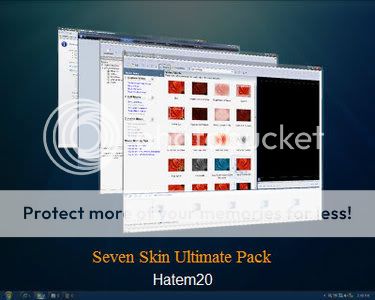
Support OS:
Windows XP (Home, Pro, RTM, SP1, SP2, SP3, Corporate).
Windows 2003 (Standard, Enterprise, Datacenter, Web, RTM, SP1, SP2).
Windows Media Center Edition (2003, 2004, 2005).
Windows XP Tablet PC Edition.
IPB Image
Including:
+ Seven Taskbar Iconizer by Vishal Gupta for xp taskbar in to seven iconized taskbar.
+ Drive Icon by artArmin for changes my computer drive icons to seven drive icons.
+ Rainmeter by Gavatx for seven desktop gadgets in xp.
+ Replacer by Undefined for replace changed system files.
+ Reshacker by Angus Johnson for change system files.
+ Styler by ta2027 for seven toolbar in xp.
+ TransBar by Anders Kjersem for seven glass taskbar in xp.
+ TrueTransparency by Lefreut for seven glass windows border in xp.
+ UXTheme Patch & LSPatch by Mr.WindowsX for multi theme support & remove logoff/shutdown text button.
+ ViOrb & ViSplore & ViStart by Lee for seven start button & aero explorer & seven startmenu in xp.
+ VisualTaskTips by serge for seven taskbar tooltip in xp.
+ WinFlip by Koji Higashino for seven Flip 3D in xp.
+ Windows File Protection Switcher by Techconnect Magazine for disable windows file protection dialog.
+ YzShadow by M.Yamaguchi for glass startmenu and windows border shadow in xp.
+ Aero Seven WindowBlinds Skin for glass theme support in xp.
+ Seven Visual style Theme & Cursors & Media & Screen Saver & Wallpaper.
Download Link:
US,EU,RU,Canada Downloads
Download here
PHI and Rest of the World
Download here

Advanced Wallpaper Manager - This application is an powerful wallpaper manager and changer. Is a utility that will help you configure your desktop wallpaper easily. Is has a simple and intuitive control panel to customize your desktop wallpaper conveniently.
key features of "Advanced Wallpaper Manager":
· User friendly interface
· Create play lists of your favorite wallpapers and customize them as you like
· Can change wallpaper automatically after a specified time period (e.g. every 10 minutes)
· Can change wallpaper on every Windows startup
· Does not make changes to your images, just create new wallpaper image and set it
· You can rotate, flip and zoom image
· You can select any portion of your image and fit it to Screen
· Multiple resizing options: Crop to Screen, Fit to Screen, Stretch to Screen.
· High quality image resize
· Use a system tray icon for an easy control of the software
· Easy install/uninstall

Y'z Shadow is an enhancement software which adds a shadow effect to Windows in pursuit of the beauty of a shadow. It also allows the user the option of making menus transparent.
Main Features :
- Attaches a drop shadow to the windows.
- Makes it possible to select one type of shadow effect in the active window and a different one in the inactive window.
- The user can choose to have transparent menus. There is also the option of selecting the degree of transparency in the menus.
- Add a drop shadow to the menus.
- Add a drop shadow to the taskbar.
- The width, depth, etc. of the drop shadows can all be set to your liking in the settings dialog.
- It works correctly with either WindowsXP styles or classic style.
- The user can specify application windows that you wish to exclude from having the drop shadow effect.
- The user can choose a setting that will automatically adjust your windows so they do not overlap or interfere with the taskbar.
- Available in different languages.

Desktop3D is tailored to replace the standard Windows Desktop and bring new features.
Desktop3D includes more of 100 icons that replaces the default icons on a large and beautiful with alpha - effect (Transparency). Desktop3D replaces the wallpaper on animated pictures that will definitely give a twist to your desktop. The default setup includes three skins, there are a beautiful blue sea representation, a fire and a nice looking rainy autumn day, and more skins is available on the web-site.
Desktop3D features a user friendly interface, which lets you change your new desktop's appearance and behavior in few seconds. Desktop3D is fully integrated with Windows Shell. The program is very stable and has a small memory footprint and low CPU usage, so you can free your processor time for other tasks.
Here are some key features of "Desktop3D":
· Animated Wallpaper
· Large beautiful icons
· 100+ icon replacements
· Ease of adjustment
· Skins support
· Changable icons size
· User frendly interface
Download Link:
US,EU,RU,Canada Downloads
Download here
PHI and Rest of the World
Download here

True mathematical algorithm of the screensaver generates a very realistic real-time fire effects.
Unlimited number of color combinations of the fire. Really FANTASTIC flame! Additional fire parameters such as wind gust speed and direction and burning intensity.
Flexible presets system. A lot of ready fire styles comes included.
The screensaver includes a comfortable fire effects editor with a real-time flame preview.
'Random' fire style. You never get tired of watching!
Lots of awesome fire backgrounds!
Changing the flame styles and background images periodically in the full-screen mode. A pretty fine effect - burning images to another ones!
Nice fire sound. There are 9 different fire sounds to choose from. Be aware! Your guests can think you have a big camp fire in your house! (Of course, you're able to mute the sound!).
Ability to choose any music for playing while the screensaver is running full-screen. Listen your favorite music with the sound of fire in the background! Just watch and relax! Some music titles come included.
You can take snapshots of your burning desktop anytime. Get fire screenshots with one key press!
* Controlling the screensaver in the full-screen mode. Turning fire sound and music on/off, loading next flame styles and backgrounds, and even changing the fire intensity and wind direction available!
* Full dual monitor support. Danger! Fire around!
* A special feature which allows to launch Fantastic Flame Screensaver anytime you want by pressing a hotkey. Let's scare your friend!
* And at last, Fantastic Flame Screensaver loads your system less than most of animated 3D screensavers.

Armored drive icons, illuminated Windows start menus, custom windows, buttons and dialog boxes, a nanosuit-inspired custom wallpaper, the Official Crysis Warhead Windows XP desktop theme from Electronic Arts, NVIDIA, Ultra PC & The Skins Factory, has it all.
Turn your plain old XP desktop into a Crysis Warhead desktop. Features 3 themes, 15 icons and an ultra-cool wallpaper.

Top 5 Displays The Greetings for Windows XP| 5.3 MB
5 most popular screens for your greetings Windows.
Platform: Windows XP
OS: Windows XP
Tablet: Not required
Additional Information:
Instructions for installing the screen saver on your computer is in the archive
Download Link:
US, EU, RU and Canada Download from Uploading
Click to Download
PHI and Rest of the World Download from Good
Click to Download
Broken Link: Try it here!


